iOS web clip install guide
The profile download has started (or will start now). Follow the steps below on iPhone / iPad. A Huangguo Short Drama icon will appear on the Home Screen.
Use Safari on iPhone or iPad.
The demo UI is generic. Treat on-screen names as Huangguo Short Drama; the real icon and label come from your profile.
01/05
In Safari, tap Allow
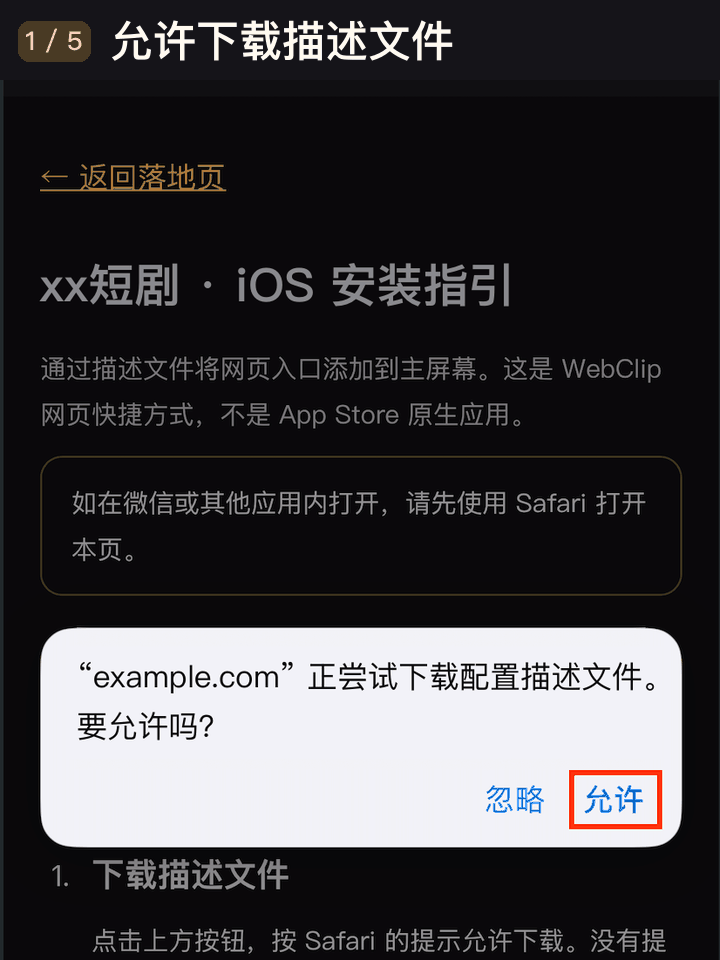
In Safari, tap Allow
Written steps
Allow the download
Tap Allow in the Safari prompt. If nothing downloads, return home and tap Get the app once more.
Review and install
Open Settings → Profile Downloaded (or General → VPN & Device Management). Confirm Huangguo Short Drama / web clip details, then install. If it is unsigned, verify the source with the official site first.
Open from Home Screen
After install, return to the Home Screen and tap the Huangguo Short Drama icon.